
Existing pipeline
Let’s start where we left off in the Get started with pipeflow vignette, that is, we have the following pipeline.
pip
# <pipeflow> my-pip (4 steps)
# ---------------------------
#    step                     params  depends state                out
# 1: data                       data           done <data.frame[10x6]>
# 2: prep                         df     data  done <data.frame[10x7]>
# 3:  fit                  data,xVar     prep  done           <lm[13]>
# 4: plot model,data,xVar,xLab,title fit,prep  done  <ggplot2::ggplot>
# ---------------------------
# <ready> last run: 2026-10-02 20:37:19
with the following set data
pip_get_params(pip)[["data"]] |> head(3)
#   Ozone Solar.R Wind Temp Month Day
# 1    41     190  7.4   67     5   1
# 2    36     118  8.0   72     5   2
# 3    12     149 12.6   74     5   3
Insert new step
Let’s say we want to insert a new step after the prep
step that standardizes the y-variable. To do this, we use
pip_add() with the after argument.
pip |> pip_add(
    "standardize",
    function(data = ~prep,
             yVar = "Ozone") {
        data[, yVar] <- scale(data[, yVar])
        data
    },
    after = "prep"
)
pip
# <pipeflow> my-pip (5 steps)
# ---------------------------
#           step                     params  depends state                out
# 1:        data                       data           done <data.frame[10x6]>
# 2:        prep                         df     data  done <data.frame[10x7]>
# 3: standardize                  data,yVar     prep   new             [NULL]
# 4:         fit                  data,xVar     prep  done           <lm[13]>
# 5:        plot model,data,xVar,xLab,title fit,prep  done  <ggplot2::ggplot>
# ---------------------------
# <ready> last run: 2026-10-02 20:37:19
library(visNetwork)
do.call(visNetwork, args = pip_graph(pip)) |>
    visHierarchicalLayout(direction = "LR", sortMethod = "directed")
The standardize step is now part of the pipeline, but so
far it is not used by any other step.
Replace existing steps
Let’s revisit the function definition of the fit
step
pip[["fit", "fun"]]
# function (data = ~prep, xVar = "Temp.Celsius")
# {
#     lm(paste("Ozone ~", xVar), data = data)
# }
# <environment: 0x5644e3705e30>
To use the standardized data, we need to change the data dependency
such that it refers to the standardize step. Also instead
of a fixed y-variable in the model, let’s pass it as a parameter.
pip |> pip_replace(
    "fit",
    function(data = ~standardize, # <- changed data reference
        xVar = "Temp.Celsius",
        yVar = "Ozone" # <- new y-variable
    ) {
        lm(paste(yVar, "~", xVar), data = data)
    }
)
The plot step needs to be updated in a similar way.
pip |> pip_replace(
    "plot",
    function(model = ~fit,
             data = ~standardize, # <- changed data reference
             xVar = "Temp.Celsius",
             yVar = "Ozone", # <- new y-variable
             title = "Linear model fit") {
        coeffs <- coefficients(model)
        ggplot(data) +
            geom_point(aes(.data[[xVar]], .data[[yVar]])) +
            geom_abline(intercept = coeffs[1], slope = coeffs[2]) +
            labs(title = title)
    }
)
The updated pipeline now looks as follows.
pip
# <pipeflow> my-pip (5 steps)
# ---------------------------
#           step                     params         depends state                out
# 1:        data                       data                  done <data.frame[10x6]>
# 2:        prep                         df            data  done <data.frame[10x7]>
# 3: standardize                  data,yVar            prep   new             [NULL]
# 4:         fit             data,xVar,yVar     standardize   new             [NULL]
# 5:        plot model,data,xVar,yVar,title fit,standardize   new             [NULL]
# ---------------------------
# <ready> last run: 2026-10-02 20:37:19
We see that the fit and plot steps now use
(i.e., depend on) the standardized data. Let’s re-run the pipeline and
inspect the output.
pip_set_params(pip, params = list(xVar = "Solar.R", yVar = "Wind"))
pip_run(pip)
# info [2026-10-02 18:37:20.599 UTC]: Starting run of pipeflow 'my-pip'
# info [2026-10-02 18:37:20.599 UTC]: Step 1/5 data - skipping done step
# info [2026-10-02 18:37:20.599 UTC]: Step 2/5 prep - skipping done step
# info [2026-10-02 18:37:20.599 UTC]: Step 3/5 standardize
# info [2026-10-02 18:37:20.601 UTC]: Step 4/5 fit
# info [2026-10-02 18:37:20.602 UTC]: Step 5/5 plot
# info [2026-10-02 18:37:20.610 UTC]: Finished run of pipeflow 'my-pip'
pip[["fit", "out"]] |> coefficients()
#  (Intercept)      Solar.R
#  0.979672739 -0.006625601
pip[["plot", "out"]]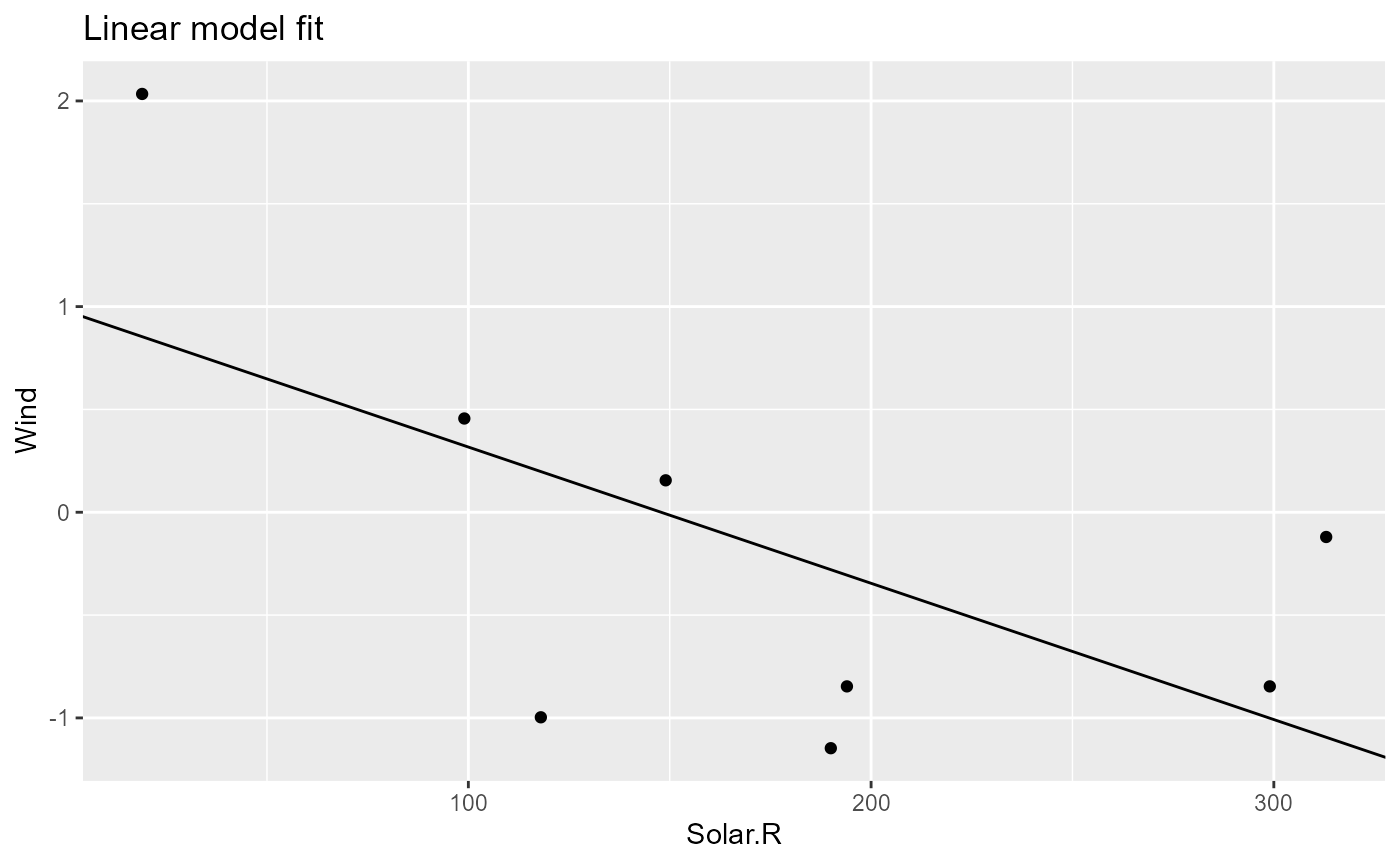
Removing steps
Let’s see the pipeline again.
pip
# <pipeflow> my-pip (5 steps)
# ---------------------------
#           step                     params         depends state                out
# 1:        data                       data                  done <data.frame[10x6]>
# 2:        prep                         df            data  done <data.frame[10x7]>
# 3: standardize                  data,yVar            prep  done <data.frame[10x7]>
# 4:         fit             data,xVar,yVar     standardize  done           <lm[13]>
# 5:        plot model,data,xVar,yVar,title fit,standardize  done  <ggplot2::ggplot>
# ---------------------------
# <ready> last run: 2026-10-02 20:37:20
When you are trying to remove a step, {pipeflow} by default checks if the step is used by any other step, and raises an error if removing the step would violate the integrity of the pipeline
try(pip_remove(pip, "standardize"))
# Error in pip_remove(pip, "standardize") :
#   cannot remove step 'standardize' because the following steps depend on it: 'fit', 'plot'
To enforce removing a step together with all its downstream
dependencies, you can use the force argument.
pip_remove(pip, "standardize", force = TRUE)
# Removing step 'standardize' and its downstream dependencies: 'fit', 'plot'
pip
# <pipeflow> my-pip (2 steps)
# ---------------------------
#    step params depends state                out
# 1: data   data          done <data.frame[10x6]>
# 2: prep     df    data  done <data.frame[10x7]>
# ---------------------------
# <ready> last run: 2026-10-02 20:37:20
Naturally, the last step never has any downstream dependencies, so it can be removed without any issues.
last_step <- tail(pip[["step"]], 1)
pip_remove(pip, last_step)
pip
# <pipeflow> my-pip (1 step)
# --------------------------
#    step params depends state                out
# 1: data   data          done <data.frame[10x6]>
# --------------------------
# <ready> last run: 2026-10-02 20:37:20
Replacing steps in a pipeline as shown in this vignette will allow to re-use existing pipelines and adapt them programmatically to new requirements. Another way of re-using pipelines is to combine them, which is shown in the Combine pipelines vignette.